Documentation / Custom Login URL
Custom Login URL
Overview
By default, every WordPress site uses wp-login.php as the login page address. Since this path is well-known, it is a common target for automated brute-force attacks. The Login URL feature lets you replace wp-login.php with a custom path of your choosing, making your login page harder to find.
Enabling the Custom Login URL
- Navigate to Settings → Login Customizer.
- Open the Functionality tab.
- Expand the Login URL panel.
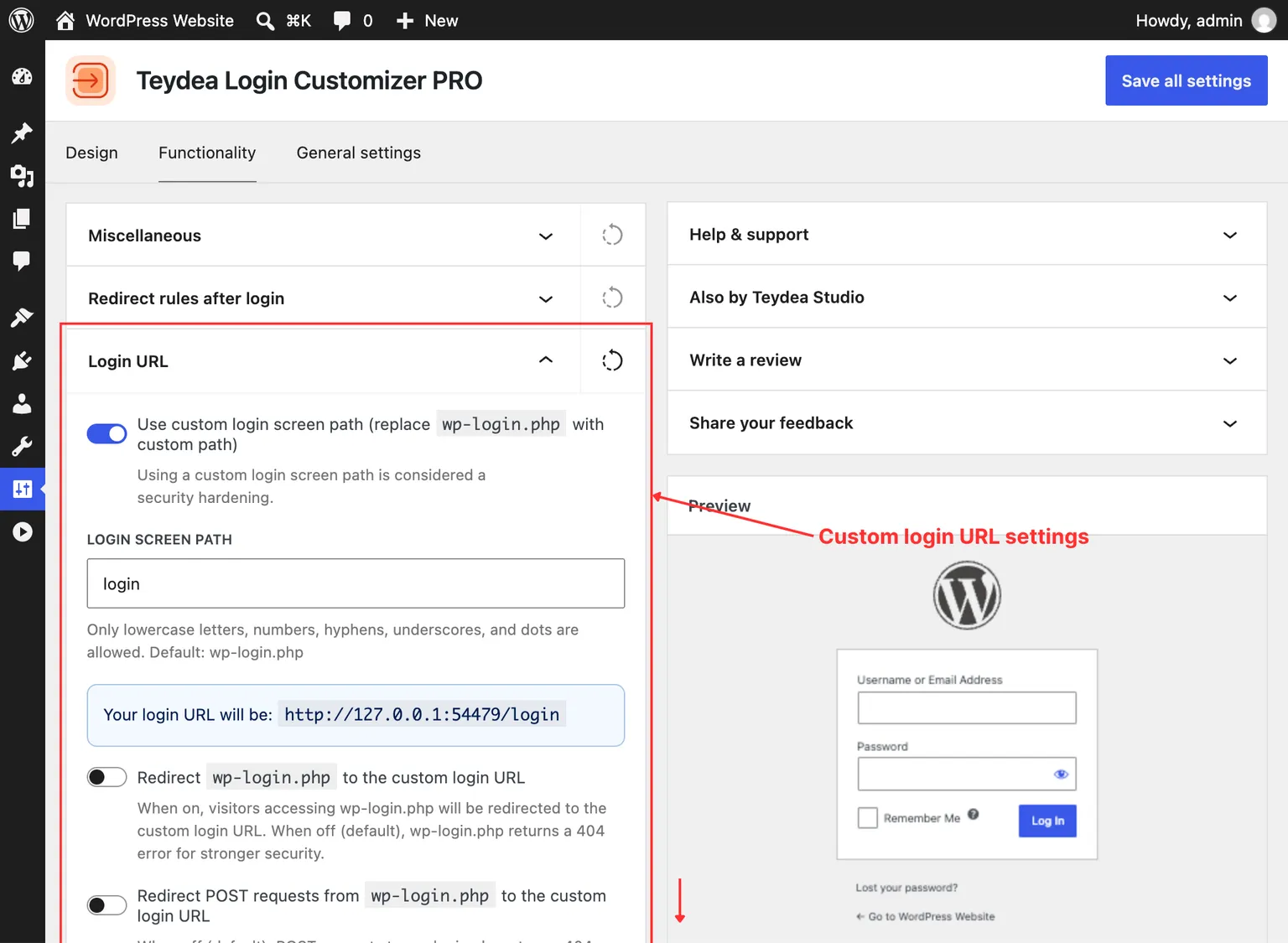
- Toggle Use custom login screen path to on.
Setting the Custom Path
After enabling the feature, a text field appears where you enter your custom login path. The path supports lowercase letters, numbers, hyphens, underscores, and dots, with a maximum length of 64 characters.
For example, entering my-login would make your login page accessible at https://yoursite.com/my-login.
A blue notice below the field shows your full login URL so you can verify it is correct before saving.
Reserved Paths
Certain paths are reserved by WordPress and cannot be used. If you enter a reserved path, an error notice appears. Reserved paths include: wp-admin, wp-content, wp-includes, wp-json, wp-cron, xmlrpc, wp-signup, wp-activate, wp-trackback, wp-links-opml, and wp-comments-post.
Handling Direct wp-login.php Access
Once a custom login URL is active, you control what happens when someone visits the original wp-login.php address:
Redirect to Custom URL (Off by Default)
The Redirect wp-login.php to the custom login URL toggle controls whether visitors to wp-login.php are redirected to your new login path. When off (the default), wp-login.php returns a 404 error, providing stronger security since the old login path appears not to exist.
POST Request Handling
When the redirect toggle is off, an additional option appears: Redirect POST requests from wp-login.php to the custom login URL. This controls how form submissions to wp-login.php are handled:
- Off (default) — POST requests to
wp-login.phpreturn a 404 error. This is the most secure option as it blocks all automated login attempts directed at the default path. - On — POST requests are redirected to your custom URL. Enable this if you use third-party plugins that hardcode
wp-login.phpin their form actions.
After Saving
After clicking Save all settings, the custom login URL takes effect immediately. The admin bar logout link automatically updates to reflect the new path.
Warning: Once the custom login URL is active,
wp-login.phpreturns a 404 error by default. If you forget your custom path you will be locked out of the login page. Save or bookmark your custom login URL before leaving this settings screen.
Unauthenticated visitors who try to access /wp-admin/ are automatically redirected to the custom login URL instead of wp-login.php.