Documentation / Complexity Rules
Complexity Rules
Overview
When the Enforce the password complexity requirements rule is enabled, passwords must meet the character-type requirements you select. Each sub-rule can be toggled independently under the Password complexity requirements group in the Rule settings section.
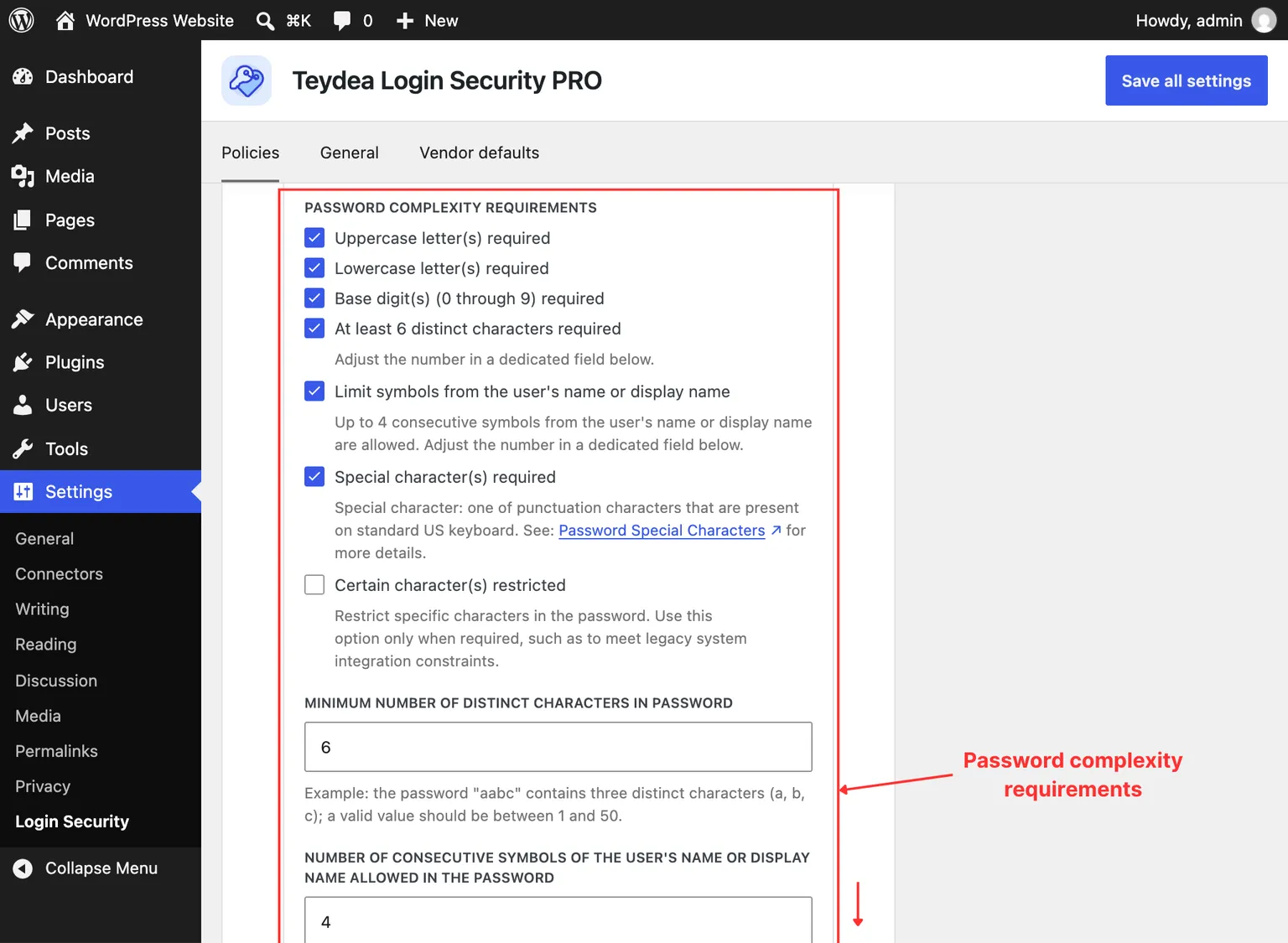
Character Type Requirements
Uppercase Letter(s) Required
When checked, passwords must contain at least one uppercase letter (A-Z).
Lowercase Letter(s) Required
When checked, passwords must contain at least one lowercase letter (a-z).
Base Digit(s) Required
When checked, passwords must contain at least one digit (0 through 9).
Special Character(s) Required
When checked, passwords must contain at least one special character. Special characters are punctuation characters present on a standard US keyboard, as defined by the OWASP Password Special Characters list. These include characters such as !, @, #, $, %, and others.
Unique Characters
Minimum Unique (Non-Repeated) Characters
When checked, passwords must contain a minimum number of distinct characters. For example, the password “aabc” has three unique characters (a, b, c).
Configure the threshold using the Minimum number of unique (non-repeated) characters in password field. The value must be between 1 and 50 (default: 6).
Username Restrictions
Maximum Consecutive User Symbols
When checked, passwords cannot contain more than a specified number of consecutive characters from the user’s username or display name. This prevents users from basing their password on their own name.
Configure the threshold using the Number of consecutive symbols of the user’s name or display name allowed in the password field. The value must be between 0 and 50 (default: 4).
For example, if set to 2 and the username is “Bart”, the password may contain “ba”, “ar”, or “rt”, but not “bar” or “art”. Setting the value to 0 prevents any character of the username or display name from appearing in the password.
Whatever the limit, each name the account carries — the complete username, and the complete display name when one is set — is always rejected outright, including when a name is short enough that it contains no run longer than the limit. With the default of 4, a user whose username is “bart” cannot use a password containing “bart”, even though “bart” is only four characters long.
Matching ignores letter case, so “Bar” and “bAR” are rejected just as “bar” is.
Restricted Characters
Certain Character(s) Restricted
When checked, passwords cannot contain specific characters you define. This is useful for meeting legacy system integration constraints.
When you enable this option, a Restricted characters field appears. Type each character individually to add it to the restricted list. Users will see an error if their password contains any of the restricted characters.
How Characters Are Counted
Wherever a rule counts characters — unique characters, the length of a run matched against the user’s username or display name, and the minimum and maximum password length (see Length Rules) — the count is in characters, not bytes. A character stored as several bytes, such as an accented letter (ł, é) or a Cyrillic, Greek, or CJK letter, counts once rather than once per byte.
A password written in a non-Latin alphabet is therefore measured on the same terms as an ASCII one: “hasło” is five characters, so it counts as five unique characters and fails a minimum length of six.
One caveat: an accent can also be typed as a separate combining mark following its base letter instead of as a single accented character. Written that way, the letter and the mark count as two characters toward the length rules, and as two distinct characters toward the unique-characters rule.